JavaScript - Basics, How It Works, and How to Test (Part 2).
In the previous part, we already considered how to add and debug JavaScript code to a page using the built-in console in the browser on the example of solving a quadratic equation. However, using the console is convenient for testing written functions, but the user needs something more convenient for work. Specifically: familiar input fields and buttons.
In this publication, we will consider an example of adding "nyashnye" buttons and input fields to our page using Bootstrap and the jQuery library.
So, let's get started. We take the already ready-made example from the previous publication, and we will develop it:
<!DOCTYPE html>
<html lang="en">
  <head>
    <meta charset="utf-8">
    <meta http-equiv="X-UA-Compatible" content="IE=edge">
    <meta name="viewport" content="width=device-width, initial-scale=1">
    <title>Тест Java Script Console</title>

  </head>
  <body>
    Тестируем jаvascript!

    <script>
            function solve(a,b,c)
            {

                var D = b*b-4*a*c;

                if (D<0)
                {
                    console.log(":(");
                }
                else
                {
                    console.log("x1 = " + (-b-Math.sqrt(D))/(2*a));
                    console.log("x2 = " + (b-Math.sqrt(D))/(2*a));
                }
            }
    </script>

  </body>
</html>
First, we will connect the necessary libraries, download the latest version of BootStrap here: mybootstrap.ru.
After downloading, unpack the contents to the folder where the HTML file is located.
Next, we add the CSS file by adding the following record to the header tag:
<link href="css/bootstrap.min.css" rel="stylesheet">
Now, add input fields for the coefficients "a", "b", "c" and the "Solve" button to the page. To do this, add the following code after the body tag:
<div class="container">
        <!--Поля ввода коэфициентов-->
	<div class="row">


            A=<input type=\'text\' id=\'a\'/>
            B=<input type=\'text\' id=\'b\'/>
            C=<input type=\'text\' id=\'c\'/>


        </div>
        <!--Кнопка по нажатию на которую должно произойти вычисление корней-->
        <div class="row">
            <button class="btn btn-success" onclick="solve();">Решить</button>


        </div>

	<!--Элементы в которые будут записаны вычисленные квадратные корни-->
        <div class="row">
            <div id=\'x1\'></div>
            <div id=\'x2\'></div>

        </div>

    </div>
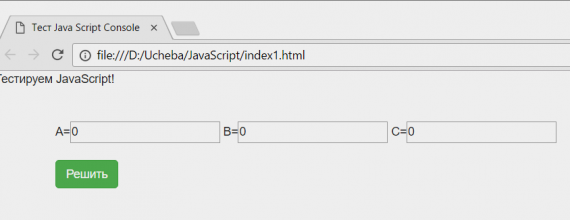
If we run our page at this stage, we will already see input fields and a button.
However, when you click on the coveted button, nothing will happen, and all because we need to teach our function to take data from the coefficient fields and display it in the answer fields.
To do this, we will connect the jQuery library (without it, the method onclick will not work) and the Bootstrap function library:
<script src="https://ajax.googleapis.com/ajax/libs/jquery/1.12.4/jquery.min.js"></script>
    <script src="js/bootstrap.min.js"></script>
Now, change our script as follows:
<script>
    function solve(a,b,c)
    {
        var a=$(\'#a\').val(),
            b=$(\'#b\').val(),
            c=$(\'#c\').val();

        var D = b*b-4*a*c;

        if (D<0)
        {
            console.log(":(");
            $(\'#x1\').html("");
            $(\'#x2\').html("Корней нет!");
        }
        else
        {
            console.log("x1 = " + (-b-Math.sqrt(D))/(2*a));
            console.log("x2 = " + (b-Math.sqrt(D))/(2*a));
            $(\'#x1\').html("x1 = " + (-b-Math.sqrt(D))/(2*a));
            $(\'#x2\').html("x2 = " + (b-Math.sqrt(D))/(2*a));
        }
    }
    </script>
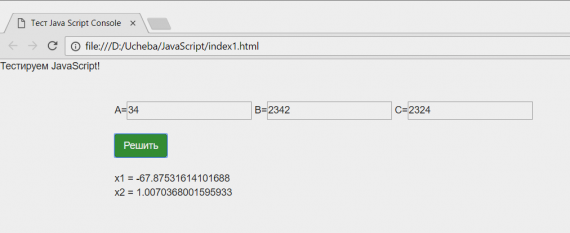
Now, the function takes values from the necessary fields, and at the end of calculations, it returns the result, in addition to the console, to the specified elements on the page.
Result:
That's it.
For the sake of completeness, the full working source code:
<!DOCTYPE html>
<html lang="en">
  <head>
    <meta charset="utf-8">
    <meta http-equiv="X-UA-Compatible" content="IE=edge">
    <meta name="viewport" content="width=device-width, initial-scale=1">
    <title>Тест Java Script Console</title>

    <link href="css/bootstrap.min.css" rel="stylesheet">

  </head>
  <body>
    Тестируем jаvascript!
    <div class="container">
        <!--Поля ввода коэфициентов-->
	<div class="row">


            A=<input type=\'text\' id=\'a\'/>
            B=<input type=\'text\' id=\'b\'/>
            C=<input type=\'text\' id=\'c\'/>


        </div>
        <!--Кнопка по нажатию на которую должно произойти вычисление корней-->
        <div class="row">
            <button class="btn btn-success" onclick="solve();">Решить</button>


        </div>

	<!--Элементы в которые будут записаны вычесленные квадратные корни-->
        <div class="row">
            <div id=\'x1\'></div>
            <div id=\'x2\'></div>

        </div>

    </div>

    <script src="https://ajax.googleapis.com/ajax/libs/jquery/1.12.4/jquery.min.js"></script>
    <script src="js/bootstrap.min.js"></script>

    <script>
    function solve(a,b,c)
    {
        var a=$(\'#a\').val(),
            b=$(\'#b\').val(),
            c=$(\'#c\').val();

        var D = b*b-4*a*c;

        if (D<0)
        {
            console.log(":(");
            $(\'#x1\').html("");
            $(\'#x2\').html("Корней нет!");
        }
        else
        {
            console.log("x1 = " + (-b-Math.sqrt(D))/(2*a));
            console.log("x2 = " + (b-Math.sqrt(D))/(2*a));
            $(\'#x1\').html("x1 = " + (-b-Math.sqrt(D))/(2*a));
            $(\'#x2\').html("x2 = " + (b-Math.sqrt(D))/(2*a));
        }
    }
    </script>


  </body>
</html>
Questions and comments are welcome.
First part of the publication: jаvascript - Basics, How It Works, and How to Test.
Comments (0)
No comments yet.