Programming a Laser Scanner on Cipher (9300) Terminals C#
It's time to write the second publication on programming reading devices for data collection terminals. In this publication, I will provide an example of programming a laser scanner on Cipher 9300 terminals.
Here, I will provide a simple example of creating a program on Windows CE, which will work with the scanner on Cipher 93XX terminals. In general, the original code of this program will be based on examples provided in the programming guide, but with some minor improvements. It's surprising that those who created the guide and SDK for developers of this device did not bother to post at least a couple of working examples.
So, in order. Let's start with what we need for development.
As I mentioned earlier, we need the SDK, which, in fact, we will need three libraries, two for .NET, and one for the reader, which simply needs to be with the project: Reader_Ce_Net.DLL, SystemApi_Ce_Net.DLL, ReaderDll_CE.dll.
All three libraries can be accumulated in the internet, if you try very hard (you will have to try very, very, very hard). Here, another swine peculiarity of CipherLab specialists is revealed. On the company's website, you will not find any SDK or documentation for development. To get it, you will be offered to write a letter to them and ask for it. The SDK and documentation are provided with the data collection terminal on this disk: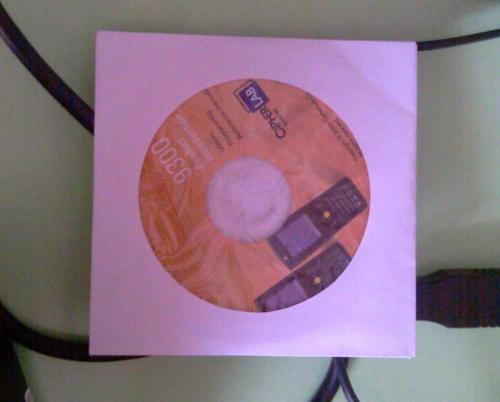
although, as I mentioned earlier, if you try hard enough, you can accumulate the necessary libraries in the internet.
Assuming we have the disk (if there is a terminal, then there is a disk), let's move on to development.
First, we need to create a project for a mobile device in Visual Studio, and then add to the created project, through Add Reference, the two libraries mentioned earlier: Reader_Ce_Net.DLL, SystemApi_Ce_Net.DLL.
The ReaderDll_CE.dll library needs to be added to the catalog with the ready program in the end, this library will be necessary for the work of the first two.
After adding the libraries, we write in the code:
using Cipherlab.SystemAPI;
using System.Runtime.InteropServices;
using Microsoft.WindowsCE.Forms;
We throw on the form TextBox and a couple of buttons Button. — for displaying the read information.
We describe two classes:
public class MsgWindow : MessageWindow
    {
        public UInt32 decodeMsg = 0;
        int b1 = 0;
        byte[] lpbuf = new byte[25];
        string tmp;

        public Form1 msgform;
        public MsgWindow(Form1 msgform)
        {
            this.msgform = msgform;
            decodeMsg = Win32API.RegisterWindowMessage("WM_DECODEDATA");
        }

        protected override void WndProc(ref Message msg)
        {
            if (msg.Msg == decodeMsg)
            {
                switch (msg.WParam.ToInt32())
                {
                    case 7: //Это ШК...
                        b1 = Reader.ReaderEngineAPI.GetDecodeData(ref tmp);
                        //this.msgform.textBox1.Text = tmp; //Это то как по инструкции.
                        //Мы же расширим функционал и заставим работать считыватель в множестве форм.
                        CallBackMy.callbackEventHandler(tmp);
                        break;
                    default:
                        break;
                }
            }
            base.WndProc(ref msg);
        }
    }

public class Win32API
    {
        [DllImport("coredll.dll", SetLastError = true)]
        public static extern uint RegisterWindowMessage(string lpString);
    }
The first class deals with the direct receipt of data from the reader, the second registers the function RegisterWindowMessage, necessary for the first.
Now, let's turn it on:
MsgWindow MsgWin;

public Form1()
        {
            //Слушает событие которое генерируется считыванием ШК.
            CallBackMy.callbackEventHandler = new CallBackMy.callbackEvent(this.CipherBarcode);
            InitializeComponent();

            //Инициируем считыватель.
            MsgWin = new MsgWindow(this);
            int b1 = 0;
            string ver = string.Empty;
            b1 = Reader.ReaderEngineAPI.GetDllVer(ref ver);
            textBox1.Text = ver;
            b1 = Reader.ReaderEngineAPI.InitReader();
        }

void CipherBarcode(string bar)
        {
            textBox1.Text = bar;
        }
In the class MsgWindow there is some change, and instead of sending the read data directly to TextBox1, the event is passed to the event handler CallBackMy. If you want the reading to work only in the current form, you can simply return the line with TextBox1, we want the reading to work in all forms of our application, so we do the following:
In Program.cs, we describe the class:
public static class CallBackMy
    {
        public delegate void callbackEvent(string what);
        public static callbackEvent callbackEventHandler;
    }
We add another form Form2 to the project, throw on it TextBox and a button, the code of the second form:
public Form2()
        {
            CallBackMy.callbackEventHandler = new CallBackMy.callbackEvent(this.CipherBarcode);
            InitializeComponent();

        }

        void CipherBarcode(string bar)
        {
            textBox1.Text = bar;
        }

        private void button1_Click(object sender, EventArgs e)
        {
            Form1 frm = (Form1)this.Owner;
            frm.return_scaner();

            Close();
        }
In the first form, we add a button to open the second form, and a function to handle the return to the first form:
private void button2_Click(object sender, EventArgs e)
        {
            Form2 frm = new Form2();
            frm.Owner = this;
            frm.Show();
        }

public void return_scaner()
        {
            CallBackMy.callbackEventHandler = new CallBackMy.callbackEvent(this.CipherBarcode);
        }
The function return_scaner() is necessary to return the event handling of reading the barcode from the second form back to the first, the first form will automatically take over the event handling when created.
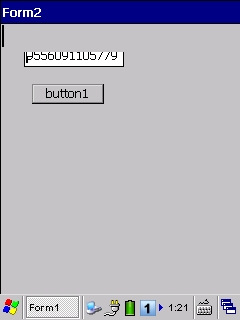
That's it, it should be approximately like this: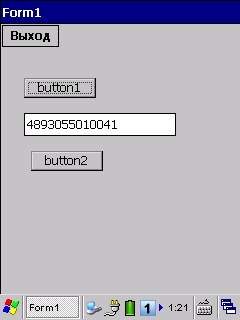
Download the source code example:
ciphertestreader.rar · 16 downloads
- ciphertestreader.rar 192 KB 16 downloads
Comments (0)
No comments yet.