Your Server and Client to It via TcpListener and TcpClient C#
Not long ago, I stumbled upon an article on Habr about TcpListener - it was used to create a Web server. Since there are some tasks that require creating a similar application, it was decided to study the issue and try to recreate what was seen. I rewrote what was in the publication in an application (I always do this before downloading the source code - better for understanding) and ran it, but it didn't work. Actually, it worked, but occasionally - somehow crookedly and not suitable for a real working application. I downloaded the source code - the same thing, it worked but occasionally. Here it works occasionally - means that the client sometimes connected and sometimes didn't connect to the server. I decided to study the issue from scratch. I accumulated some material from the internet, and it all worked out - a testable working application.
I wanted to do: The example consists of two applications - a server and a client. (I'm not particularly interested in a Web server, although the example can be easily converted to it.)
Server - accepts data from the client (text), converts the string received from the client to uppercase letters and sends it back to the client.
Client - sends a specified string to the client (done to run several clients, including from different machines, to see how the server behaves) with a sequential number added to the sent text and receives the same number of responses from the server with the text in uppercase letters.
Additionally - initially, the example was without using ThreadPool, but then I decided to add it, so the server should work more stably (in my opinion) and handle a larger number of simultaneous requests.
Since I commented the code well, I'll bring it as is, without additional description.
Server:
using System;
using System.Collections.Generic;
using System.Linq;
using System.Text;
using System.IO;
using System.Net;
using System.Net.Sockets;
using System.Threading;


namespace ExampleTcpListener_Console
{
    class ExampleTcpListener
    {
        static void Main(string[] args)
        {
            TcpListener server = null;
            try
            {
                // Определим нужное максимальное количество потоков
                // Пусть будет по 4 на каждый процессор
                int MaxThreadsCount = Environment.ProcessorCount * 4;
                Console.WriteLine(MaxThreadsCount.ToString());
                // Установим максимальное количество рабочих потоков
                ThreadPool.SetMaxThreads(MaxThreadsCount, MaxThreadsCount);
                // Установим минимальное количество рабочих потоков
                ThreadPool.SetMinThreads(2, 2);


                // Устанавливаем порт для TcpListener = 9595.
                Int32 port = 9595;
                IPAddress localAddr = IPAddress.Parse("127.0.0.1");
                int counter = 0;
                server = new TcpListener(localAddr, port);

                // Запускаем TcpListener и начинаем слушать клиентов.
                server.Start();

                // Принимаем клиентов в бесконечном цикле.
                while (true)
                {

                    Console.Write("\\nWaiting for a connection... ");

                    // При появлении клиента добавляем в очередь потоков его обработку.
                    ThreadPool.QueueUserWorkItem(ObrabotkaZaprosa,server.AcceptTcpClient());
                    // Выводим информацию о подключении.
                    counter++;
                    Console.Write("\\nConnection №" + counter.ToString() + "!");

                }
            }
            catch (SocketException e)
            {
                //В случае ошибки, выводим что это за ошибка.
                Console.WriteLine("SocketException: {0}", e);
            }
            finally
            {
                // Останавливаем TcpListener.
                server.Stop();
            }


            Console.WriteLine("\\nHit enter to continue...");
            Console.Read();
        }

        static void ObrabotkaZaprosa(object client_obj)
        {
            // Буфер для принимаемых данных.
            Byte[] bytes = new Byte[256];
            String data = null;

            //Можно раскомментировать Thread.Sleep(1000);
            //Запустить несколько клиентов
            //и наглядно увидеть как они обрабатываются в очереди.
            //Thread.Sleep(1000);

            TcpClient client = client_obj as TcpClient;

            data = null;

            // Получаем информацию от клиента
            NetworkStream stream = client.GetStream();

            int i;

            // Принимаем данные от клиента в цикле пока не дойдём до конца.
            while ((i = stream.Read(bytes, 0, bytes.Length)) != 0)
            {
                // Преобразуем данные в ASCII string.
                data = System.Text.Encoding.ASCII.GetString(bytes, 0, i);

                // Преобразуем строку к верхнему регистру.
                data = data.ToUpper();

                // Преобразуем полученную строку в массив Байт.
                byte[] msg = System.Text.Encoding.ASCII.GetBytes(data);

                // Отправляем данные обратно клиенту (ответ).
                stream.Write(msg, 0, msg.Length);

            }

            // Закрываем соединение.
            client.Close();


        }
    }
}
Client:
using System;
using System.Collections.Generic;
using System.Linq;
using System.Text;
using System.IO;
using System.Net;
using System.Net.Sockets;

namespace ExampleTcpClient
{
    class Program
    {
        static void Main(string[] args)
        {
            for (int i = 0; i < 100; i++)
            {
                Console.WriteLine("\\n Позиция № "+i.ToString()+"\\n");
                Connect("127.0.0.1", "Hello World! №"+i.ToString());
            }
            Console.WriteLine("\\n Press Enter to continue...");
            Console.Read();
        }

        static void Connect(String server, String message)
        {
            try
            {
                // Создаём TcpClient.
                // Для созданного в предыдущем проекте TcpListener
                // Настраиваем его на IP нашего сервера и тот же порт.

                Int32 port = 9595;
                TcpClient client = new TcpClient(server, port);

                // Переводим наше сообщение в ASCII, а затем в массив Byte.
                Byte[] data = System.Text.Encoding.ASCII.GetBytes(message);

                // Получаем поток для чтения и записи данных.
                NetworkStream stream = client.GetStream();

                // Отправляем сообщение нашему серверу.
                stream.Write(data, 0, data.Length);
                Console.WriteLine("Sent: {0}", message);

                // Получаем ответ от сервера.

                // Буфер для хранения принятого массива bytes.
                data = new Byte[256];

                // Строка для хранения полученных ASCII данных.
                String responseData = String.Empty;

                // Читаем первый пакет ответа сервера.
                // Можно читать всё сообщение.
                // Для этого надо организовать чтение в цикле как на сервере.
                Int32 bytes = stream.Read(data, 0, data.Length);
                responseData = System.Text.Encoding.ASCII.GetString(data, 0, bytes);
                Console.WriteLine("Received: {0}", responseData);

                // Закрываем всё.
                stream.Close();
                client.Close();
            }
            catch (ArgumentNullException e)
            {
                Console.WriteLine("ArgumentNullException: {0}", e);
            }
            catch (SocketException e)
            {
                Console.WriteLine("SocketException: {0}", e);
            }


        }
    }
}
Here's what I got: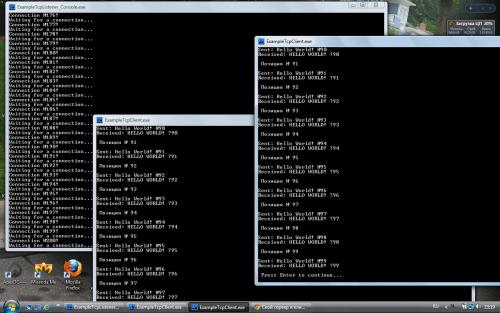
Source code can be downloaded here:
exampletcplistener.rar · 32 downloads
- exampletcplistener.rar 78.6 KB 32 downloads
Comments (0)
No comments yet.