Hello World - First Mobile Application on C# .NET CF.
Here I will provide an example of creating the simplest application for a PDA on the .net cf platform.
For developing applications, we will use Visual Studio - you can choose from 2003 to the latest, it's better to choose the newer one, the differences between versions are not significant (at least in the case of the example being considered).
There is another point. In 2005 and later versions of Visual Studio, .NET CF is used - at least version 2. From which it follows that your applications will not work on all that does not support at least the second framework. Such devices are extremely rare (personally, I only met industrial terminals on Windows CE 4.2) - but if this is your case, then here there is no choice but Visual Studio 2003, although it is better to update the equipment, in my opinion.
So - we start Visual Studio and create a new project. We will develop the application in C#. To create a new application, we choose the Smart Device tab, specify the project name and framework version. In the latest version, 2008 Visual Studio, you can choose 2, 3, and 3.5 frameworks.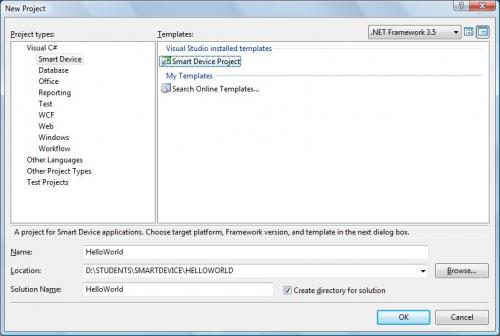
Next, we choose the device type. In our case, it's not very important - we'll choose PocketPC 2003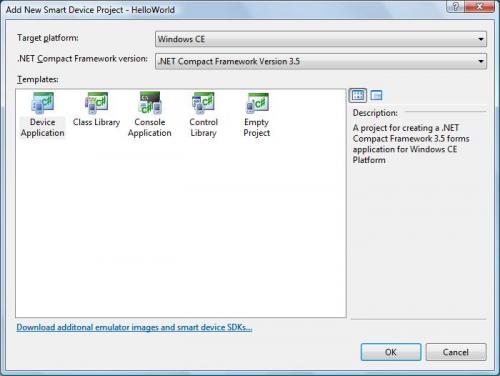
A window will appear with a form to which we add a Button (Button1) and a Label - text (Label1) we get this: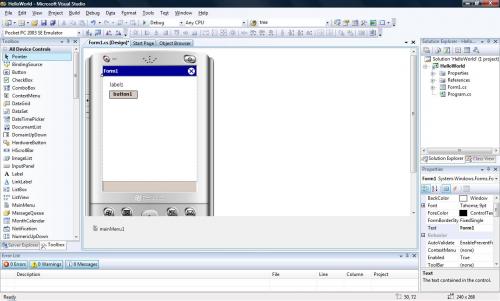
Now, we create an event handler for the button's OnClick event. When the button is clicked, we will change the text in Label1 to Hello World!.
That's it - we run our project in the emulator.
We click the button and admire the result.
If you have a device for experiments, you need to install .NET CF 3.5 on the device in advance - only then copy the files from the Debug project folder and run them.
private void button1_Click(object sender, EventArgs e)
        {
            label1.Text = "Hello World!";
        }
That's it - we run our project in the emulator.
We click the button and admire the result.
If you have a device for experiments, you need to install .NET CF 3.5 on the device in advance - only then copy the files from the Debug project folder and run them.
Comments (0)
No comments yet.