DataGridView Example of Programmatic Adding Cells C#.
Here I will provide an example of programmatic adding cells, and accordingly columns and rows.
This may be necessary when you very much need to fill DataGridView and at the same time do not need a DataSet.
In my case, this is required most often when it is necessary to fill some parameters that may differ for the same object, for example, there may be a different number, in addition, they may be of different type, etc.
So, example:
DataGridViewColumn col = new DataGridViewColumn();
            col.HeaderText = "Параметр";
            col.ReadOnly = true;
            DataGridViewColumn col1 = new DataGridViewColumn();
            col1.HeaderText = "Значение";
            col1.ReadOnly = false;

            dataGridView1.Columns.Add(col);
            dataGridView1.Columns.Add(col1);

            DataGridViewCell cel1 = new DataGridViewTextBoxCell();
            DataGridViewCell cel2 = new DataGridViewTextBoxCell();
            cel1.Style.BackColor = Color.LightGray;
            DataGridViewRow row = new DataGridViewRow();
            cel1.Value = "Штуки";
            cel2.Value = "";
            row.Cells.AddRange(cel1, cel2);
            dataGridView1.Rows.Add(row);

            cel1 = new DataGridViewTextBoxCell();
            cel2 = new DataGridViewTextBoxCell();
            cel1.Style.BackColor = Color.LightGray;
            row = new DataGridViewRow();
            cel1.Value = "Коэф.";
            cel2.Value = "";
            row.Cells.AddRange(cel1, cel2);
            dataGridView1.Rows.Add(row);

            cel1 = new DataGridViewTextBoxCell();
            cel2 = new DataGridViewTextBoxCell();
            cel1.Style.BackColor = Color.LightGray;
            row = new DataGridViewRow();
            cel1.Value = "Вес";
            cel2.Value = "";
            row.Cells.AddRange(cel1, cel2);
            dataGridView1.Rows.Add(row);

            cel1 = new DataGridViewTextBoxCell();
            cel2 = new DataGridViewTextBoxCell();
            cel1.Style.BackColor = Color.LightGray;
            row = new DataGridViewRow();
            cel1.Value = "Штрих-Код";
            cel2.Value = "";
            row.Cells.AddRange(cel1, cel2);
            dataGridView1.Rows.Add(row);
Here is how it looks in the result: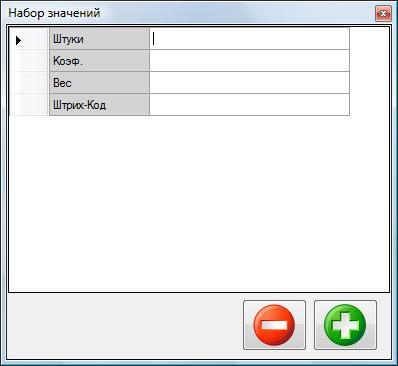
Comments (0)
No comments yet.