Example of a synchronous AJAX request on JQuery and .NET Core C#
This publication provides an example of how to perform an asynchronous request to the server without reloading the current page, using JQuery on .NET Core.
So let's get started.
First, we need to create a Web site project on .NET Core, for example as here: https://babakov.net/programming/cs/138-cscorevs.html
Now modify or create a new Home controller with two methods:
Index — displays the page
GetInfo — handles the request and returns the response in JSON format
Controller:
using System;
using System.Collections.Generic;
using Microsoft.AspNetCore.Mvc;


namespace JQueryPostRequestNetCore.Controllers
{
    public class HomeController : Controller
    {
        /// <summary>
        /// Возвращает страницу сайта
        /// </summary>
        /// <returns></returns>
        public IActionResult Index()
        {
            return View();
        }

        /// <summary>
        /// Возвращает данные по запросу
        /// </summary>
        /// <param name="id"></param>
        /// <returns></returns>
        public JsonResult GetInfo(Int64 id)
        {
            var value = new List<string>();
            for (long i = 0; i < id; i++)
            {
                value.Add("Элемент № "+i.ToString());
            }

            return Json(value);
        }
    }
}
Now let's create a JQuery script that will send a request to the server to our GetInfo method and handle the result in some way.
Create a script site.js:
function getInfo(id) {

    $.post("/Home/GetInfo", { id: id })
        .done(function (data) {

            var count = data.length;
            console.log(count);

            var result_str = "";
            for(var i=0;i<count;i++)
            {
                console.log(data[i]);
                result_str = result_str+" "+ data[i];
            }
            $("#result_text").html(result_str);
            console.log(data);
        });
}
This script sends a request to the server to return some number of elements specified in id Then it displays the received data in the console, and converts it to a text view and places it on the page in a paragraph with the identifier result_text.
Now let's create the Index.cshtml view:
<html>
<head>
    <script src="lib/jquery/dist/jquery.min.js" type="text/jаvascript"></script>
    <link rel="stylesheet" href="lib/bootstrap/dist/css/bootstrap.css"/>
    <link rel="stylesheet" href="css/site.css"/>
    <script src="js/site.js" type="text/jаvascript"></script>
</head>
<body>
<div class="text-center">
    <h1 class="display-4">Тестируем AJAX запрос на .NET Core</h1>
    <p id="result_text"></p>
    <a class="btn btn-info btn-sm" onclick="getInfo(3);">Выполнить запрос на 3 элемента</a>
</br>
    <a class="btn btn-info btn-sm" onclick="getInfo(10);">Выполнить запрос на 10 элементов</a>
</br>
    <a class="btn btn-info btn-sm" onclick="getInfo(0);">Выполнить запрос на 0 элементов</a>
</br>
</div>
</body>
</html>
In this view, we connect the necessary libraries, mark the paragraph result_text where we will display the received data, and three buttons with different calls to the getInfo function.
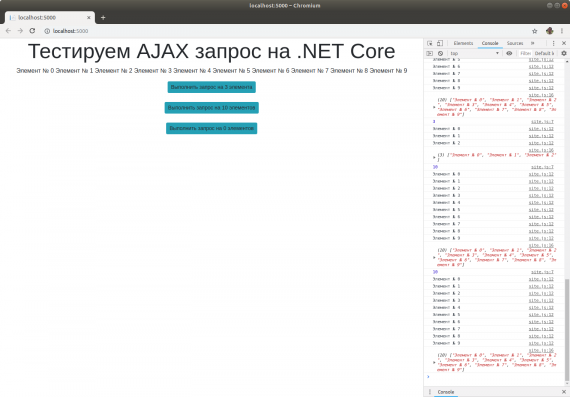
As a result, when you click on any of the buttons, the client script will perform a request to the server, receive a response in JSON format, and display the result on the page without reloading it.
Here's how it should look:
That's it.
Comments (0)
No comments yet.