Example of a Simple Calculator in JavaScript (for educational purposes only).
Here, in this publication, an example of how to use Bootstrap and a simple JavaScript code to create a web page that can solve quadratic equations is demonstrated.
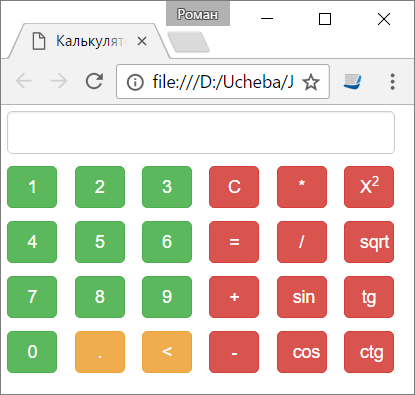
Here, a more interesting example of code will be presented, which implements a very simple online calculator.
Here's how our calculator will look:
So, let's get started…
The entire example is presented in its entirety, and it is quite simple to understand.
Comments are present in the example itself.
<!DOCTYPE html>
<html lang="en">
  <head>
  <head>
    <meta charset="utf-8">
    <meta http-equiv="X-UA-Compatible" content="IE=edge">
    <meta name="viewport" content="width=device-width, initial-scale=1">
    <title>Калькулятор на Java Script</title>

    <link href="css/bootstrap.min.css" rel="stylesheet">

    <style>
    .btn
        {
            width: 40px;
            margin: 5px;
        }
    .form-control
        {
            width: 310px;
            margin: 5px;
        }
    </style>

  </head>
  <body>
    <div class="container">

        <!--Поле ввода и кнопки калькулятора-->

        <div class="row">
            <div>
            <input id=\'expr\' class=\'form-control\'/>
            </div>
        </div>
        <div class="row">
            <div>
                <button id=\'b1\' class=\'btn btn-success\'>1</button>
                <button id=\'b2\' class=\'btn btn-success\'>2</button>
                <button id=\'b3\' class=\'btn btn-success\'>3</button>
                <button id=\'bClear\' class=\'btn btn-danger\'>C</button>
                <button id=\'bMult\' class=\'btn btn-danger\'>*</button>
                <button id=\'bX2\' class=\'btn btn-danger\'>X<sup>2</sup></button>
            </div>
            <div>
                <button id=\'b4\' class=\'btn btn-success\'>4</button>
                <button id=\'b5\' class=\'btn btn-success\'>5</button>
                <button id=\'b6\' class=\'btn btn-success\'>6</button>
                <button id=\'bCalc\' class=\'btn btn-danger\'>=</button>
                <button id=\'bDiv\' class=\'btn btn-danger\'>/</button>
                <button id=\'bSqrt\' class=\'btn btn-danger\'>sqrt</button>
            </div>
            <div>
                <button id=\'b7\' class=\'btn btn-success\'>7</button>
                <button id=\'b8\' class=\'btn btn-success\'>8</button>
                <button id=\'b9\' class=\'btn btn-success\'>9</button>
                <button id=\'bPlus\' class=\'btn btn-danger\'>+</button>
                <button id=\'bSin\' class=\'btn btn-danger\'>sin</button>
                <button id=\'bTg\' class=\'btn btn-danger\'>tg</button>
            </div>
            <div>
                <button id=\'b0\' class=\'btn btn-success\'>0</button>
                <button id=\'bDot\' class=\'btn btn-warning\'>.</button>
                <button id=\'bDel\' class=\'btn btn-warning\'><</button>
                <button id=\'bMinus\' class=\'btn btn-danger\'>-</button>
                <button id=\'bCos\' class=\'btn btn-danger\'>cos</button>
                <button id=\'bCtg\' class=\'btn btn-danger\'>ctg</button>
            </div>
        </div>


    </div>

    <!--Подключаем библиотеки-->
    <script src="https://ajax.googleapis.com/ajax/libs/jquery/1.12.4/jquery.min.js"></script>
    <script src="js/bootstrap.min.js"></script>

    <!--Сам скрипт выполняющий действия по нажатию на кнопки нашего калькулятора-->
    <script>
    $(function(){
        $(\'#b1\').click(function(){$(\'#expr\').val($(\'#expr\').val()+\'1\');});
        $(\'#b2\').click(function(){$(\'#expr\').val($(\'#expr\').val()+\'2\');});
        $(\'#b3\').click(function(){$(\'#expr\').val($(\'#expr\').val()+\'3\');});
        $(\'#b4\').click(function(){$(\'#expr\').val($(\'#expr\').val()+\'4\');});
        $(\'#b5\').click(function(){$(\'#expr\').val($(\'#expr\').val()+\'5\');});
        $(\'#b6\').click(function(){$(\'#expr\').val($(\'#expr\').val()+\'6\');});
        $(\'#b7\').click(function(){$(\'#expr\').val($(\'#expr\').val()+\'7\');});
        $(\'#b8\').click(function(){$(\'#expr\').val($(\'#expr\').val()+\'8\');});
        $(\'#b9\').click(function(){$(\'#expr\').val($(\'#expr\').val()+\'9\');});
        $(\'#b0\').click(function(){$(\'#expr\').val($(\'#expr\').val()+\'0\');});
        $(\'#bDot\').click(function(){$(\'#expr\').val($(\'#expr\').val()+\'.\');});
        $(\'#bDel\').click(function(){$(\'#expr\').val($(\'#expr\').val().slice(0,-1));});
        $(\'#bClear\').click(function(){$(\'#expr\').val("");});
        $(\'#bPlus\').click(function(){$(\'#expr\').val($(\'#expr\').val()+\'+\');});
        $(\'#bMinus\').click(function(){$(\'#expr\').val($(\'#expr\').val()+\'-\');});
        $(\'#bDiv\').click(function(){$(\'#expr\').val($(\'#expr\').val()+\'/\');});
        $(\'#bMult\').click(function(){$(\'#expr\').val($(\'#expr\').val()+\'*\');});
        $(\'#bX2\').click(function(){$(\'#expr\').val(\'Math.pow(\'+$(\'#expr\').val()+\',2)\');});
        $(\'#bSqrt\').click(function(){$(\'#expr\').val(\'Math.sqrt(\'+$(\'#expr\').val()+\')\');});
        $(\'#bSin\').click(function(){$(\'#expr\').val(\'Math.sin(\'+$(\'#expr\').val()+\')\');});
        $(\'#bCos\').click(function(){$(\'#expr\').val(\'Math.cos(\'+$(\'#expr\').val()+\')\');});
        $(\'#bTg\').click(function(){$(\'#expr\').val(\'Math.tan(\'+$(\'#expr\').val()+\')\');});
        $(\'#bCtg\').click(function(){$(\'#expr\').val(\'Math.cos(\'+$(\'#expr\').val()+\')/Math.sin(\'+$(\'#expr\').val()+\')\');});
        $(\'#bCalc\').click(function(){$(\'#expr\').val(eval($(\'#expr\').val()));});

    });

    </script>

  </body>
</html>
And that's it!
Questions and comments are welcome.
Comments (0)
No comments yet.