Dynamic Creation of Display Elements and Outputting Data to Them in C#
Here I will provide an example of dynamic creation of TextBox fields, with outputting values to these fields from a data source.
Right to the point:
1. We set some variables and a couple of arrays.
DataSet ds = new DataSet(); //Создаем источник данных.
TextBox[] tb = new TextBox[100];//Массив из 100 текстбоксов, можно и списком воспользоваться, но пусть будет так.
Label[] lb = new Label[100]; //Массив подписей к полям.
int row_num = 0; //Номер выбранной записи в таблице.
2. When loading the form, or by a specified event, we load the data source, create the necessary number of fields, and display them on the form. In this case, we display all data on a panel, placed on the form as we see fit.
//При загрузке загружаем источник данных
            ds.ReadXml("dataset.xml");

            //Смотрим сколько полей в таблице и создаём нужное количество ТекстБоксов

            int Y=50;//Для определения положения полей по вертикали.

            for (int i = 0; i < ds.Tables["Table"].Columns.Count; i++)
            {
                //Задаем описание поля
                lb[i] = new Label();
                lb[i].Text=ds.Tables["Table"].Columns[i].ColumnName;
                lb[i].Parent = panel1;
                lb[i].Top = Y * i;
                //Создаем текстбокс для поля.
                tb[i] = new TextBox();
                tb[i].Parent = panel1;
                tb[i].Top = Y * i + 20;
                //Одновременно выводим всё это на panel1.
            }
3. Function for displaying the necessary table row.
//Получаем данные
        private void GetRecord()
        {
            //Проверка есть ли данные вообще.
            if (ds.Tables["Table"].DefaultView.Count > 0)
            {

                //Если дошли до последней записи прыгаем на первую.
                if (ds.Tables["Table"].DefaultView.Count < (row_num + 1))
                {
                    row_num = 0;
                }

                //Обновление данных в текстбоксах
                for (int i = 0; i < ds.Tables["Table"].Columns.Count; i++)
                {
                    tb[i].Text = ds.Tables["Table"].DefaultView[row_num][i].ToString();
                }
            }
        }
The row number is set in the variable row_num
That's it.
The screenshot of what it should approximately look like: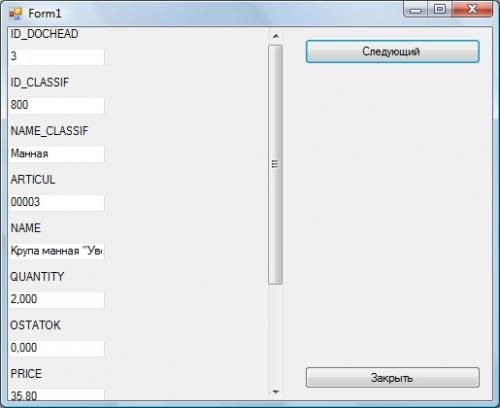
Here you can download the source example:
testtextboxdataset.rar · 21 downloads
- testtextboxdataset.rar 45.1 KB 21 downloads
Comments (0)
No comments yet.