Drawing Beautiful Lines in Windows Mobile on C#
Here I will provide an example code for drawing using GDI+ for Windows Mobile. A good man, Alex Feinman, presented a great library OpenNETCF.GDIPlus for drawing very beautiful lines using various brushes and fills. The library is available with source code and allows doing amazing things, the most useful (in my opinion) of which are the ability to draw transparent objects (Transparent) and edge smoothing, which makes lines significantly more attractive.
So, here is the example code:
//Обязательно включаем в проект...
using OpenNETCF.GDIPlus;

namespace TestGDIPLUS
{
    public partial class Form1 : Form
    {
        public Form1()
        {
            InitializeComponent();
        }

        //Это параметры для использования GDI+
        GdiplusStartupInput input = new GdiplusStartupInput();
        GdiplusStartupOutput output;
        IntPtr token;


        //Сюда будем грузить картинки фона (это я чтобы эффектней смотрелось)...
        Bitmap imageBackground;

        //Ширина и всота экрана по умолчанию...
        int scr_width = 480;
        int scr_heigth = 640;

        private void menuItem2_Click(object sender, EventArgs e)
        {
            //В руководстве написано что необходимо выполнить при выходе - но у меня выдаёт ошибку.
            //А без него (GdiplusShutdown) всё нормально поэтому закомментировал.
            //NativeMethods.GdiplusShutdown(token);


            Application.Exit();
        }

        private void Form1_Load(object sender, EventArgs e)
        {
            //Это запускаем GDI+
            GpStatus stat = NativeMethods.GdiplusStartup(out token, input, out output);

            //Задаём реальные размеры экрана...
            scr_width = Screen.PrimaryScreen.Bounds.Width;
            scr_heigth = Screen.PrimaryScreen.Bounds.Height;

            //Загружаем картинку фоновую - чтобы пример эффектнее смотрелся...
            imageBackground = new Bitmap(TestGDIPLUS.Properties.Resources.fon);

        }

        private void Form1_Paint(object sender, PaintEventArgs e)
        {
            using (Graphics graphics = Graphics.FromImage(imageBackground))
            {
                IntPtr hdc = graphics.GetHdc();
                using (GraphicsPlus g = new GraphicsPlus(hdc))
                {
                    SmoothingMode mode = g.GetSmoothingMode();
                    //Это чтобы края линий сглаживались...
                    g.SetSmoothingMode(SmoothingMode.SmoothingModeAntiAlias);

                    //Рисуем линию в виде стрелки...
                    PenPlus pen = new PenPlus(Color.Green, 40);
                    pen.SetEndCap(LineCap.LineCapArrowAnchor);
                    pen.SetStartCap(LineCap.LineCapRound);
                    g.DrawLine(pen, 50, 50, scr_width - 50, 50);

                    //Рисуем прерывистую линию в виде стрелки с началом в виде кружочка...
                    pen = new PenPlus(Color.Blue, 40);
                    pen.SetEndCap(LineCap.LineCapArrowAnchor);
                    pen.SetStartCap(LineCap.LineCapRoundAnchor);
                    pen.SetDashStyle(DashStyle.DashStyleDot);
                    g.DrawLine(pen, 50, 150, scr_width - 50, 150);

                    //Рисуем линию в крапинку...
                    BrushPlus brHatch = new HatchBrush(HatchStyle.HatchStyle50Percent, Color.Black, Color.White);
                    pen = new PenPlus(brHatch, 40);
                    pen.SetEndCap(LineCap.LineCapTriangle);
                    pen.SetStartCap(LineCap.LineCapSquareAnchor);
                    g.DrawLine(pen, 50, 250, scr_width - 50, 250);


                    //Рисуем полупрозрачную линию...
                    pen = new PenPlus(Color.FromArgb(-0x5f7f7f7f), 40);
                    pen.SetEndCap(LineCap.LineCapFlat);
                    pen.SetStartCap(LineCap.LineCapAnchorMask);
                    g.DrawLine(pen, 50, 350, scr_width - 50, 350);

                    g.SetSmoothingMode(mode);
                }
                graphics.ReleaseHdc(hdc);
            }
	//Помещаем созданное изображение на форму...
            Graphics gr = this.CreateGraphics();
            gr.DrawImage(imageBackground, 0, 0);
        }


    }
}
Here is what you get as a result of running the example (lines look clearly more attractive compared to standard ones):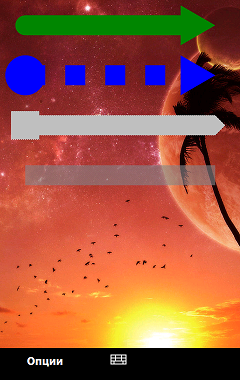
You can download the source code of the example here:
testgdiplus.rar · 21 downloads
You can see examples in English and download the library source code here: http://community.opennetcf.com/articles/cf/archive/2007/10/31/using-gdi-on-windows-mobile.aspx
- testgdiplus.rar 3.5 MB 21 downloads
Comments (0)
No comments yet.