Vehicle Number Plate Recognition with C# (.NET)
I recently had to help with the launch of a project under .NET on WCF - on a 64-bit system, the project worked normally on x86 but refused to work on x64. In general, as I expected, the problem was solved quite simply, in addition to the main problem, several others emerged in the process of solving, which required me to get acquainted with a very interesting library Emgu CV, which allows you to do a lot of remarkable things, including number plate recognition from an image.
Thanks to this library, you can easily and simply implement number recognition in your program. I decided to share my new knowledge, maybe someone will want to implement something like this. For example, I immediately thought of an idea for an automatically opening gate, without any fobs. :) The quality of recognition is not very good, although it's possible that I just didn't understand the capabilities well enough, and I did everything as in the default examples, but still worth playing with - an interesting thing.
In principle, the library comes with a set of examples, including an example of number plate recognition. But in this publication, I will provide my example.
So, let's get started…
For everything to work, we need the library itself, so we go to the Emgu CV website and download this version:
Emgu.CV-3.1.0-r16.12. (Today it's relevant, but maybe by the time you read this, a newer version will be released)
Then we simply install it. (We choose or remember the folder where we installed it)
After installation, we find in the created folder: \\Solution\\Windows.Desktop\\Emgu.CV.Example.sln - This is a test example for studying.
Study this example: License Plate Recognition 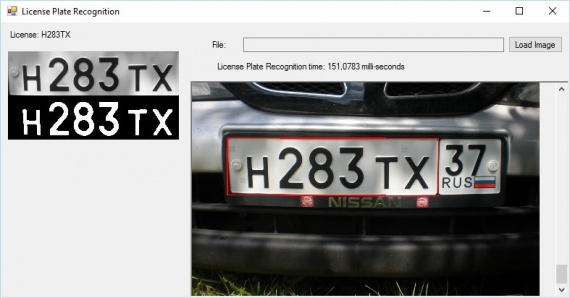
In our case, we will create a new console application that will take all photos of cars from the IMG folder and recognize the numbers on them, and write the program from scratch.
So, create a project in Visual Studio called SearchNumber
namespace SearchNumbers
{
    class Program
    {
        static void Main(string[] args)
        {
        }
    }
}
Add to the project:
Emgu.CV.UI.dll
Emgu.CV.World.dll
System.Drawing - It's not included by default in a console application.
Create a separate class NumberDetector.cs in our project, which will recognize the number.
This class is created based on the test example, slightly modified description and removed unnecessary functionality.
using System;
using System.Collections.Generic;
using System.Drawing;
using System.Text;
using Emgu.CV;
using Emgu.CV.CvEnum;
using Emgu.CV.OCR;
using Emgu.CV.Structure;
using Emgu.CV.Util;
using Emgu.Util;

namespace SearchNumbers
{
    /// <summary>
    /// Простой пример определения автомобильного номера
    /// </summary>
    class NumberDetector : DisposableObject
    {
        /// <summary>
        /// OCR Движок
        /// </summary>
        private Tesseract _ocr;

        /// <summary>
        /// Создает Оппределитель номера
        /// </summary>
        /// <param name="dataPath">
        /// Путь до папки tessdata её надо скопировать в готовый проект
        /// Путь должен заканчиваться / . Всё что после / будет стерто.
        /// </param>
        public NumberDetector(String dataPath)
        {
            //create OCR engine
            _ocr = new Tesseract(dataPath, "eng", OcrEngineMode.TesseractCubeCombined);
            _ocr.SetVariable("tessedit_char_whitelist", "ABCDEFGHIJKLMNOPQRSTUVWXYZ-1234567890");
        }


        /// <summary>
        /// Определяет номер из полученного изображения
        /// </summary>
        /// <param name="img">Изображение в котором будет происходить поиск номера</param>
        /// <param name="licensePlateImagesList">Список изображений найденных участков с номерами</param>
        /// <param name="filteredLicensePlateImagesList">Список изображений найденных участков с номерами (с удалением шума)</param>
        /// <param name="detectedLicensePlateRegionList">Список изображений найденных участков с номерами (контурный анализ MCvBox2D)</param>
        /// <returns>Список найденных номеров</returns>
        public List<String> DetectLicensePlate(
           IInputArray img,
           List<IInputOutputArray> licensePlateImagesList,
           List<IInputOutputArray> filteredLicensePlateImagesList,
           List<RotatedRect> detectedLicensePlateRegionList)
        {
            List<String> licenses = new List<String>();
            using (Mat gray = new Mat())
            using (Mat canny = new Mat())
            using (VectorOfVectorOfPoint contours = new VectorOfVectorOfPoint())
            {
                CvInvoke.CvtColor(img, gray, ColorConversion.Bgr2Gray);
                CvInvoke.Canny(gray, canny, 100, 50, 3, false);
                int[,] hierachy = CvInvoke.FindContourTree(canny, contours, ChainApproxMethod.ChainApproxSimple);

                FindLicensePlate(contours, hierachy, 0, gray, canny, licensePlateImagesList, filteredLicensePlateImagesList, detectedLicensePlateRegionList, licenses);
            }
            return licenses;
        }

        private static int GetNumberOfChildren(int[,] hierachy, int idx)
        {
            //Первое включение
            idx = hierachy[idx, 2];
            if (idx < 0)
                return 0;

            int count = 1;
            while (hierachy[idx, 0] > 0)
            {
                count++;
                idx = hierachy[idx, 0];
            }
            return count;
        }

        private void FindLicensePlate(
           VectorOfVectorOfPoint contours, int[,] hierachy, int idx, IInputArray gray, IInputArray canny,
           List<IInputOutputArray> licensePlateImagesList, List<IInputOutputArray> filteredLicensePlateImagesList, List<RotatedRect> detectedLicensePlateRegionList,
           List<String> licenses)
        {
            for (; idx >= 0; idx = hierachy[idx, 0])
            {
                int numberOfChildren = GetNumberOfChildren(hierachy, idx);
                //Если элемент не содержит (символов), то это не номер
                if (numberOfChildren == 0) continue;

                using (VectorOfPoint contour = contours[idx])
                {
                    if (CvInvoke.ContourArea(contour) > 400)
                    {
                        if (numberOfChildren < 3)
                        {
                            //Если нашли менее 3-х символов, то не считаем это номером
                            //При этом надо проверить содержимое каждого элемента внутри может содержаться номер.
                            FindLicensePlate(contours, hierachy, hierachy[idx, 2], gray, canny, licensePlateImagesList,
                               filteredLicensePlateImagesList, detectedLicensePlateRegionList, licenses);
                            continue;
                        }

                        RotatedRect box = CvInvoke.MinAreaRect(contour);
                        if (box.Angle < -45.0)
                        {
                            float tmp = box.Size.Width;
                            box.Size.Width = box.Size.Height;
                            box.Size.Height = tmp;
                            box.Angle += 90.0f;
                        }
                        else if (box.Angle > 45.0)
                        {
                            float tmp = box.Size.Width;
                            box.Size.Width = box.Size.Height;
                            box.Size.Height = tmp;
                            box.Angle -= 90.0f;
                        }

                        double whRatio = (double)box.Size.Width / box.Size.Height;
                        if (!(3.0 < whRatio && whRatio < 10.0))
                        //if (!(1.0 < whRatio && whRatio < 2.0))
                        {
                            //если соотношение сторон не соответствует, то это не номер авто.
                            //Однако мы должны проверить вложения, номер может находиться внутри контура
                            //Contour<Point> child = contours.VNext;
                            if (hierachy[idx, 2] > 0)
                                FindLicensePlate(contours, hierachy, hierachy[idx, 2], gray, canny, licensePlateImagesList,
                                   filteredLicensePlateImagesList, detectedLicensePlateRegionList, licenses);
                            continue;
                        }

                        using (UMat tmp1 = new UMat())
                        using (UMat tmp2 = new UMat())
                        {
                            PointF[] srcCorners = box.GetVertices();

                            PointF[] destCorners = new PointF[] {
                        new PointF(0, box.Size.Height - 1),
                        new PointF(0, 0),
                        new PointF(box.Size.Width - 1, 0),
                        new PointF(box.Size.Width - 1, box.Size.Height - 1)};

                            using (Mat rot = CvInvoke.GetAffineTransform(srcCorners, destCorners))
                            {
                                CvInvoke.WarpAffine(gray, tmp1, rot, Size.Round(box.Size));
                            }

                            //изменяем размер номера таким образом чтобы размер шрифта был примерно 10-12. Это даст большую точность
                            Size approxSize = new Size(240, 180);
                            double scale = Math.Min(approxSize.Width / box.Size.Width, approxSize.Height / box.Size.Height);
                            Size newSize = new Size((int)Math.Round(box.Size.Width * scale), (int)Math.Round(box.Size.Height * scale));
                            CvInvoke.Resize(tmp1, tmp2, newSize, 0, 0, Inter.Cubic);

                            //делаем отступы от краев
                            int edgePixelSize = 2;
                            Rectangle newRoi = new Rectangle(new Point(edgePixelSize, edgePixelSize),
                               tmp2.Size - new Size(2 * edgePixelSize, 2 * edgePixelSize));
                            UMat plate = new UMat(tmp2, newRoi);

                            UMat filteredPlate = FilterPlate(plate);

                            Tesseract.Character[] words;
                            StringBuilder strBuilder = new StringBuilder();
                            using (UMat tmp = filteredPlate.Clone())
                            {
                                _ocr.Recognize(tmp);
                                words = _ocr.GetCharacters();

                                if (words.Length == 0) continue;

                                for (int i = 0; i < words.Length; i++)
                                {
                                    strBuilder.Append(words[i].Text);
                                }
                            }

                            licenses.Add(strBuilder.ToString());
                            licensePlateImagesList.Add(plate);
                            filteredLicensePlateImagesList.Add(filteredPlate);
                            detectedLicensePlateRegionList.Add(box);

                        }
                    }
                }
            }
        }

        /// <summary>
        /// Фильтр номера - убирает шум
        /// </summary>
        /// <param name="plate">Изображение номера</param>
        /// <returns>Изображение номера без шума</returns>
        private static UMat FilterPlate(UMat plate)
        {
            UMat thresh = new UMat();
            CvInvoke.Threshold(plate, thresh, 120, 255, ThresholdType.BinaryInv);
            //Image<Gray, Byte> thresh = plate.ThresholdBinaryInv(new Gray(120), new Gray(255));

            Size plateSize = plate.Size;
            using (Mat plateMask = new Mat(plateSize.Height, plateSize.Width, DepthType.Cv8U, 1))
            using (Mat plateCanny = new Mat())
            using (VectorOfVectorOfPoint contours = new VectorOfVectorOfPoint())
            {
                plateMask.SetTo(new MCvScalar(255.0));
                CvInvoke.Canny(plate, plateCanny, 100, 50);
                CvInvoke.FindContours(plateCanny, contours, null, RetrType.External, ChainApproxMethod.ChainApproxSimple);

                int count = contours.Size;
                for (int i = 1; i < count; i++)
                {
                    using (VectorOfPoint contour = contours[i])
                    {

                        Rectangle rect = CvInvoke.BoundingRectangle(contour);
                        if (rect.Height > (plateSize.Height >> 1))
                        {
                            rect.X -= 1; rect.Y -= 1; rect.Width += 2; rect.Height += 2;
                            Rectangle roi = new Rectangle(Point.Empty, plate.Size);
                            rect.Intersect(roi);
                            CvInvoke.Rectangle(plateMask, rect, new MCvScalar(), -1);
                            //plateMask.Draw(rect, new Gray(0.0), -1);
                        }
                    }

                }

                thresh.SetTo(new MCvScalar(), plateMask);
            }

            CvInvoke.Erode(thresh, thresh, null, new Point(-1, -1), 1, BorderType.Constant, CvInvoke.MorphologyDefaultBorderValue);
            CvInvoke.Dilate(thresh, thresh, null, new Point(-1, -1), 1, BorderType.Constant, CvInvoke.MorphologyDefaultBorderValue);

            return thresh;
        }

        protected override void DisposeObject()
        {
            _ocr.Dispose();
        }
    }
}
This code is just a slightly modified part of the code from the example.
Now, let's write the program itself:
using System;
using System.Collections.Generic;
using System.Drawing;
using Emgu.CV;
using Emgu.CV.Structure;
using System.Diagnostics;
using Emgu.CV.Util;
using Emgu.CV.CvEnum;
using System.IO;

namespace SearchNumbers
{
    class Program
    {
        private static NumberDetector _numberDetector;

        static void Main(string[] args)
        {
            //Перебираем все *.jpg в папке img
            string dir_name = Directory.GetCurrentDirectory() + "\\\\img\\\\";
            DirectoryInfo dir = new DirectoryInfo(dir_name);
            foreach(FileInfo file in dir.GetFiles("*.jpg"))
            {
                SaveInFile(dir_name+file.Name);

                _numberDetector = new NumberDetector("");


                //Способ конвертировать из обычного Image - медленнее но может пригодиться.
                Image img_ext = Image.FromFile(dir_name + file.Name);
                Mat img = GetMatFromSDImage(img_ext);

                //Способ взять сразу картинку с диска как Mat.
                //Mat img;
                //img = CvInvoke.Imread("c:\\\\IMG\\\\960.jpg");


                UMat uImg = img.GetUMat(AccessType.ReadWrite);
                string res = ProcessImage(uImg);

                SaveInFile(res);
                SaveInFile("");
            }
            Console.WriteLine("Нажмите любую клавишу чтобы закрыть приложение.");
            //Закончили и ждем когда нажмут клавишу чтобы выйти.
            Console.ReadKey();
        }

        /// <summary>
        /// Преобразует изображение Image в Mat
        /// </summary>
        private static Mat GetMatFromSDImage(System.Drawing.Image image)
        {
            int stride = 0;
            Bitmap bmp = new Bitmap(image);

            System.Drawing.Rectangle rect = new System.Drawing.Rectangle(0, 0, bmp.Width, bmp.Height);
            System.Drawing.Imaging.BitmapData bmpData = bmp.LockBits(rect, System.Drawing.Imaging.ImageLockMode.ReadWrite, bmp.PixelFormat);

            System.Drawing.Imaging.PixelFormat pf = bmp.PixelFormat;
            if (pf == System.Drawing.Imaging.PixelFormat.Format32bppArgb)
            {
                stride = bmp.Width * 4;
            }
            else
            {
                stride = bmp.Width * 3;
            }

            Image<Bgra, byte> cvImage = new Image<Bgra, byte>(bmp.Width, bmp.Height, stride, (IntPtr)bmpData.Scan0);

            bmp.UnlockBits(bmpData);

            return cvImage.Mat;
        }

        /// <summary>
        /// Обработка изображения
        /// </summary>
        private static string ProcessImage(IInputOutputArray image)
        {

            Stopwatch watch = Stopwatch.StartNew(); //Засекаем время, чтобы понять сколько ушло на обработку

            List<IInputOutputArray> licensePlateImagesList = new List<IInputOutputArray>();
            List<IInputOutputArray> filteredLicensePlateImagesList = new List<IInputOutputArray>();
            List<RotatedRect> licenseBoxList = new List<RotatedRect>();
            List<string> words = _numberDetector.DetectLicensePlate(
               image,
               licensePlateImagesList,
               filteredLicensePlateImagesList,
               licenseBoxList);

            watch.Stop(); //Останавливаем таймер - узнали время выполнения


            Point startPoint = new Point(10, 10);
            string res = "";
            for (int i = 0; i < words.Count; i++)
            {
                Mat dest = new Mat();
                CvInvoke.VConcat(licensePlateImagesList[i], filteredLicensePlateImagesList[i], dest);

                //Показываем то, что получилось
                SaveInFile(String.Format("Номер: {0}", words[i]));

                res = words[i];
                PointF[] verticesF = licenseBoxList[i].GetVertices();
                Point[] vertices = Array.ConvertAll(verticesF, Point.Round);
                using (VectorOfPoint pts = new VectorOfPoint(vertices))
                    CvInvoke.Polylines(image, pts, true, new Bgr(Color.Red).MCvScalar, 2);

            }
            return String.Format("Время распознавания номера : {0} в миллисекундах", watch.Elapsed.TotalMilliseconds); ;

        }

        /// <summary>
        /// Ведет лог в файл, вместе с выводом в консоль.
        /// </summary>
        private static void SaveInFile(string mess)
        {
            try
            {
                string file_name_p = "Car_Numbers_"+DateTime.Now.ToString("yyMMdd", System.Globalization.CultureInfo.InvariantCulture);
                using (StreamWriter writer = new StreamWriter(file_name_p + ".log", true))
                {
                    Console.WriteLine(mess);
                    writer.WriteLine(DateTime.Now.ToString("yyyy.MM.dd HH:mm:ss.ffffff") + " :>> " + mess);
                }
            }
            catch
            {
            }
        }
    }
}
Describe the code, I think, is not necessary, it's commented enough.
After running the program, you should see the recognized numbers from the images in the IMG folder.
It should look something like this: 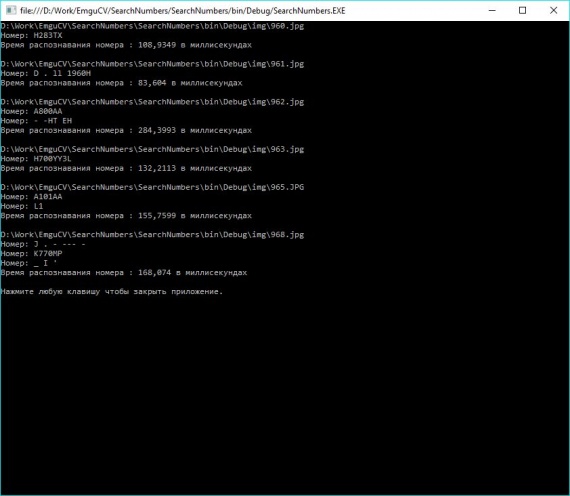
In addition, a *.log file will be created next to the executable file, which will contain everything - the same.
I hope it will be useful to someone besides me. :)
Спасибо за статью. А есть пример как распознавать номера ТС с видео-потока. Не могу понять как это сделать.
К сожалению, очень давно этим занимался.
Даты у статей не корректные, после переезда на новый движок.
Сейчас уже ни чем не помогу...