Working with FTP Server from C#
Many have probably encountered the need to create a simple FTP client for their needs in C#. I was no exception. Recently, I had to create a specific application for updating software via FTP. And the most useful thing I found for this purpose was the BytesRoad.NetSuit library (with source code). This is a very simple component that provides the main functionality for working with FTP.
BytesRoad.Diag.dll
BytesRoad.Net.Ftp.dll
BytesRoad.Net.Sockets.dll
Adding these two libraries to our project as References:
BytesRoad.Net.Ftp.dll
BytesRoad.Net.Sockets.dll
Next, how to work with the component…
Establishing a connection with the server:
//Сам клиент ФТП
FtpClient client = new FtpClient();

//Задаём параметры клиента.
client.PassiveMode = true; //Включаем пассивный режим.
int TimeoutFTP = 30000; //Таймаут.
string FTP_SERVER = "адрес фтп сервера";
int FTP_PORT = "порт ФТП сервера";
string FTP_USER = "пользователь";
string FTP_PASSWORD = "пароль";

//Если используется прокси сервер то можем задать параметры прокси.
FtpProxyInfo pinfo = new FtpProxyInfo(); //Это переменная параметров.
pinfo.Server = "192.168.0.202";
pinfo.Port = 21; //Порт.
pinfo.Type = FtpProxyType.HttpConnect; //Тип прокси - всего 4 вида.
pinfo.PreAuthenticate = true; //Если на прокси есть идентификация
pinfo.User = "Имя пользователя";
pinfo.Password = "Пароль пользователя";

//Присваиваем параметры прокси клиенту.
client.ProxyInfo = pinfo;

//Подключаемся к FTP серверу.
client.Connect(TimeoutFTP, FTP_SERVER, FTP_PORT);
client.Login(TimeoutFTP, FTP_USER, FTP_PASSWORD);

//
//.... Здесь выполняем то что хотим с сервером ...
//


//Отключаемся от ФТП сервера
client.Disconnect(TimeoutFTP);
Now, a little about the most basic methods for working with the FTP server:
//Получает список содержимого текущего каталога с FTP.
client.GetDirectoryList(TimeoutFTP);

//Меняет директорию на указанную.
//Можно переходить вверх указав вместо имени папки ".." либо в любую папку расположенную в текущей.
client.ChangeDirectory(TimeoutFTP, "папка");

//Удаляет указанный файл с сервера.
client.DeleteFile(TimeoutFTP, "файл");

//Удаляет указанную папку с сервера.
client.DeleteDirectory(TimeoutFTP, "файл");

//Принимает указанный файл с сервера.
client.GetFile(TimeoutFTP, "куда принимаем - путь на диске", "Что принимаем - файл на сервере");

//загружаем файл на сервер.
client.PutFile(TimeoutFTP, "имя файла на сервере", "что грузим - имя файла на компьютере");
As you have probably noticed, it's not very convenient to have to specify the timeout every time. However, this can be tolerated. The rest works fine.
I would normally provide a link to the developer's website where you can download the component, but it seems the website has gone through a crisis :). Therefore, I will deviate from my rule, and you can download the library here:
bytesroad_netsuit_2_0.zip · 54 downloads
Also, I wrote a small example of working with this component (upload, delete, and get files are implemented in the example, right-click menu).
Here are the screenshots: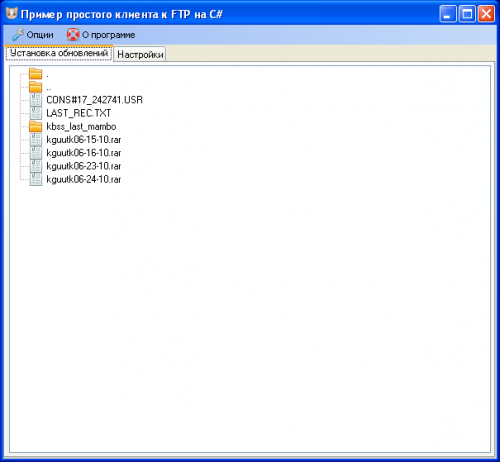
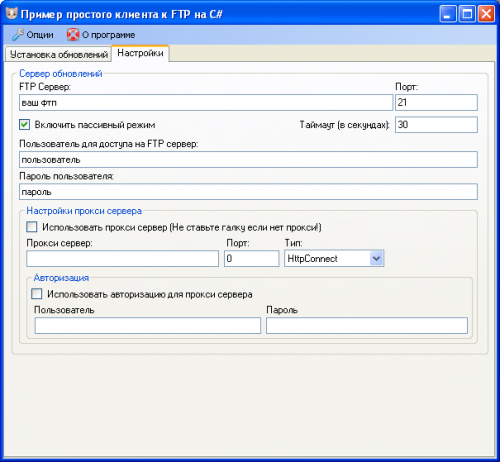
And here is the source code: bytesroadftpexample.rar · 59 downloads
- bytesroadftpexample.rar 308.2 KB 59 downloads
- bytesroad_netsuit_2_0.zip 1.3 MB 54 downloads
Comments (0)
No comments yet.