Changing Screen Orientation in .NET CF and Running PUTTY. C#
Encountered a big need to run Putty (ssh client) on my HD2. And everything is fine, downloaded, launched, everything works well but the screen width is not enough in vertical position and some information is not visible. For example, when executing the command ps -ax, the lines were simply cut off (did not fit on the screen, the lower scrollbar was missing, and it was impossible to view the information). I've been searching the internet - nothing really worked to rotate the screen for this application. As a result, I decided to quickly write my own program.
So, the program's main purpose is to rotate the screen, launch Putty, wait for Putty to complete, and return the screen to its normal position.
The code can be easily adapted to change the orientation in other programs.
So, the program itself:
using System;
using System.Linq;
using System.Collections.Generic;
using System.Text;

namespace RunPutty
{
    class Program
    {
        static void Main(string[] args)
        {
            //Переворачиваем...
            Microsoft.WindowsCE.Forms.SystemSettings.ScreenOrientation = Microsoft.WindowsCE.Forms.ScreenOrientation.Angle270;
            //Запускаем чего хотим...
            System.Diagnostics.Process proc = new System.Diagnostics.Process();

            //Задаём что запустить...
            proc.StartInfo.FileName = System.IO.Path.GetDirectoryName(System.Reflection.Assembly.GetExecutingAssembly().GetModules()[0].FullyQualifiedName).ToString()+"\\\\putty.exe";
            //Задаём рабочую папку...
            proc.StartInfo.WorkingDirectory = System.IO.Path.GetDirectoryName(System.Reflection.Assembly.GetExecutingAssembly().GetModules()[0].FullyQualifiedName).ToString() + "\\\\";
            //Запускаем приложение...
            proc.Start();
            //Заставляем ждать завершения выполнения приложения.
            proc.WaitForExit();
            //Возвращаем обратно экрнан и закрываем приложение...
            Microsoft.WindowsCE.Forms.SystemSettings.ScreenOrientation = Microsoft.WindowsCE.Forms.ScreenOrientation.Angle0;

        }
    }
}
As can be seen from the code, the program should be in the same directory as Putty.exe
Download the ready-to-run EXE file for running Putty in horizontal mode: runputty.rar · 18 downloads
Download the source code of the program: runputty_source.rar · 16 downloads
Here is a screenshot of how it will look like: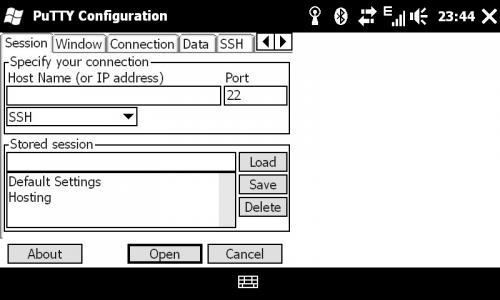
- runputty_source.rar 13 KB 16 downloads
- runputty.rar 2 KB 18 downloads
Comments (0)
No comments yet.