Bootstrap DateTimePicker - Selecting Only Month from Dropdown Menu.
In this example, we will demonstrate how to make a dropdown menu select only the month, without the day, using bootstrap-datetimepicker.
To implement this, we will need the following components:
bootstrap - the bootstrap library
jquery - the jQuery library
moment - the moment library for working with time, in this example we will use moment-with-locales
bootstrap-datetimepicker - the datetimepicker library for selecting dates
In addition, we will use the respond.js and html5shiv.min.js libraries to ensure that our example works correctly in IE.
The original HTML code (index.html):
<!DOCTYPE html>
<html lang="ru">
<head>
	<meta http-equiv="X-UA-Compatible" content="IE=edge">
	<meta charset="utf-8" />
	<link href="css/bootstrap.min.css" rel="stylesheet" />
	<link href="css/bootstrap-theme.min.css" rel="stylesheet" />
	<link href="css/bootstrap-datetimepicker.min.css" rel="stylesheet" />

	<script src="js/moment-with-locales.min.js"></script>
	<script src="js/jquery-1.9.1.min.js"></script>
	<script src="js/bootstrap.min.js"></script>
	<script src="js/bootstrap-datetimepicker.min.js"></script>

	<!--[if lt IE 9]-->
	<script src="js/html5shiv.min.js"></script>
	<script src="js/respond.js"></script>
	<!--[endif]-->

</head>
	<body>


	<div class="container">
                <div class="form-group">
                    <div class=\'input-group date\' id=\'date_select\'>
                        <input type=\'text\' class="form-control" id="datetp_val" />
                        <span class="input-group-addon">
                            <span class="glyphicon glyphicon-calendar"></span>
                        </span>
                    </div>
                </div>
        </div>

	<script src="js/dpicker.js"></script>

	</body>
</html>
The original JavaScript code (dpicker.js):
// Параметры DateTimePicker-а
$(function () {
    $(\'#date_select\').datetimepicker({
        defaultDate: new Date(),
        viewMode: \'months\',
        format: \'MM.YYYY\',
        locale: \'ru\'

    });
});

// Исправление бага с месяцем в выборе даты
$("#date_select").on(\'dp.hide\', function (event) {
    setTimeout(function () {
        $("#date_select").data(\'DateTimePicker\').viewMode(\'months\');
    }, 1);
});
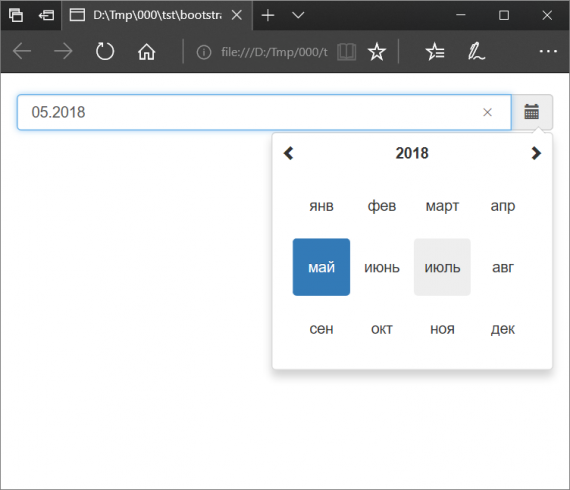
It should look something like this:
Thank you for your attention. :)
Comments (0)
No comments yet.